Write Java
A clean source editor with syntax highlighting, line numbers, and a familiar keyboard-driven interface.
The code gets the space. Everything else stays out of the way.
TURBOJ / MACOS / IN DEVELOPMENT
The ultra-fast Java editor.
Remember when writing a program was simple?
Open an editor. Write some code. Compile. Run.
TurboJ brings that workflow back to Java, with a classic keyboard-first interface, a built-in compiler workflow, and program output right where you need it.
No complicated workspace. No unnecessary panels. Just your code.
Old-school focus. Modern Java.
THE EDITOR
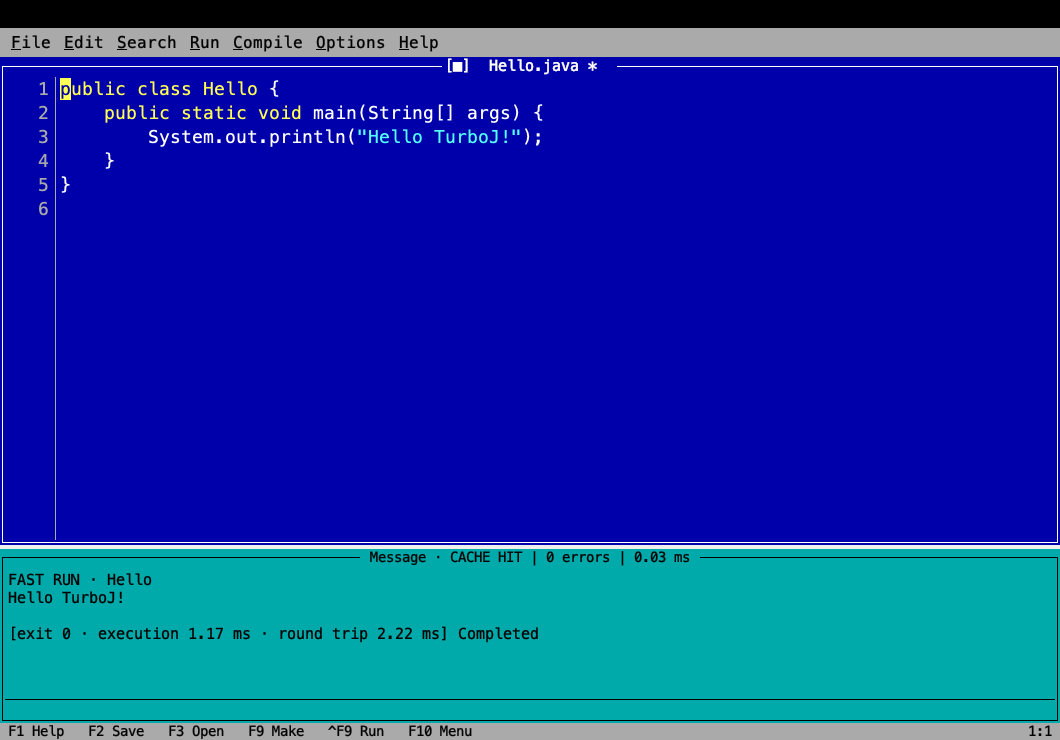
TurboJ takes inspiration from the classic DOS development environments many of us grew up with.
The blue editor. The function keys. The compiler messages. The output window.
Only this time, you're writing Java on a modern Mac.
And yes, the code actually runs.
BACK TO BASICS
Modern development tools are extraordinarily capable. But not every task needs an enormous workspace, dozens of panels, or a complex project configuration.
That's what TurboJ is for.
A focused editor built around the shortest possible path between an idea and a running program.
SMALL TOOL. SERIOUS ENGINEERING.
A clean source editor with syntax highlighting, line numbers, and a familiar keyboard-driven interface.
The code gets the space. Everything else stays out of the way.
Check and compile Java from the editor.
Compiler feedback appears directly in the message pane. No need to switch to another application just to see what went wrong.
Run a Java program and see its output immediately below the source.
Edit. Compile. Run. Repeat.
Save, open, compile, and run using shortcuts inspired by classic development tools.
F2 to save. F9 to make. Ctrl+F9 to run.
A workflow designed around your keyboard, not endless clicking.
Compiler status, errors, cache hits, and execution timings are visible without opening a separate dashboard.
Useful feedback, right when you need it.
Blue editor. Cyan console. Simple menus. Clear borders.
TurboJ brings back the development environment, not the limitations of the computers that ran it.
THE WORKFLOW
Write your Java code directly in TurboJ.
No project wizard required for a simple example.
Use the compiler from the editor and get feedback in the message pane.
Execute your program and read the output without leaving TurboJ.
Then change something and do it again.
Edit. Compile. Run. Repeat.
REAL CODE. REAL MEASUREMENTS.
TurboJ is being built around a simple engineering goal: make the time between changing Java code and seeing the result as short as possible.
The current prototype already reports compiler activity and execution timings directly in the interface.
Message · CACHE HIT
0 errors
Cache-hit operation: 0.03 ms

FAST RUN · Hello

Hello TurboJ!

exit 0
Execution: 1.17 ms
Round trip: 2.22 ms
Completed
These values come from one captured prototype run. A cache hit is not a fresh compilation, and an individual execution is not a benchmark.
We'll publish reproducible performance measurements as the project develops.
No invented benchmarks. Just measured results.
WHY TURBOJ EXISTS
TurboJ isn't trying to replace every feature of a full-scale IDE.
It doesn't need to.
It's built for those moments when all you want is an editor, a compiler, and a running Java program.
The tools we remember weren't always the ones with the longest feature lists.
They were the ones that made it easy to get things done.
Old-school focus. Modern Java.
UNDER ACTIVE DEVELOPMENT
TurboJ has moved beyond a concept.
The first working editor can open Java source, compile, run programs, and display execution output in its classic interface.
The next focus is improving the editing and execution loop, measuring latency, and making the application reliable enough for others to use.
We'll share builds, documentation, and source-code links when they're ready for public use.
Back to the editorTurboJ is a lightweight Java development environment inspired by classic DOS editors, especially the Turbo C era. Its focus is a simple, fast workflow for editing, compiling, and executing Java programs.
No. Those tools solve much larger problems. TurboJ focuses on small programs, learning, experimentation, and quick development tasks where a full IDE may be unnecessary.
Yes. TurboJ works with Java source code and executes real Java programs. It's not a Java simulator or a browser-based playground.
Because we liked that development experience. The keyboard shortcuts, compact layout, and immediate feedback were good ideas then. They're still good ideas today.
TurboJ is currently being developed for macOS. Other platforms have not been announced.
A public download will be linked here once a distributable build is ready.
READY_
We're bringing it back.
TurboJ — The ultra-fast Java editor.
Old-school focus. Modern Java.
Explore the editor